|
A list of Video Editing
Software that is
inexpensive, fast and good
quality.
|
Pinnacle Studio / Video
and AVCHD HD Camcorder
Editor
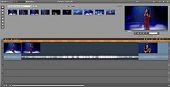
Pinnacle Studio is the
easiest to use video editor
I have tried. You can cut
sections of film out on
Pinnacle Studio and save
them. You can then drag the
cut sections onto the top
timeline, you then drag the
secont film clip onto the
same timeline next to the
first film, this joins the
two parts directly. You can
add transitions between
each part of film such as
fade-in by selecting
transitions then draging
the transition you want
onto the timeline between
the parts of film. You can
join as many parts of film
as you like, and add as
many transitions between
them as you like.
On the second timeline,
you will see the sound
line. To alter the sound,
click on the line, then
drag it up or down to
adjust the volume. The
volume can be altered up or
down at multiple places
throughout the film.
To add music to the
film, import a music file,
then drag it onto the
timeline with the symbol
for music. You can click on
the music timeline and drag
it up or down at variouse
points to suite the film.
The orignal sound and music
can be made to
interact.
You can also add voice
over and titles.
The finnished film can
be saved in many formats.
MPEG2 is normally the best
as it will play on
practicaly any device and
retain ecellent quality. If
saving in MPEG2, you can
click on settings and set
the size and frame rate,
try and save it as close to
what the original film was
made, 640 x 480 or 720 x
576 or 1080i for HD video
or whatever.
You can also save the
film in MPEG4 format (the
formate used by YouTube)
that is compressed to
reduce the size of the film
and still retains a fairly
good quality. This makes
uploading and conversion to
YouTube a lot faster.
Pinnacle also allows you
to import and edit AVCHD
video. The AVCHD video
format is used by many of
the new home Full HD video
cameras. You can then save
the AVCHD videos to any
format you want, MPEG2
1080i is normaly best with
great quality, but the file
size will be larger than it
was on AVCHD.
Price for the latest
edition that works with HD
about £60.
|
AVI/MPEG/RM/WMV
Splitter
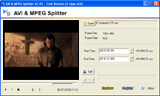
AVI/MPEG/RM/WMV Splitter
(formerly AVI & MPEG
Splitter) is a tool to
split, cut or trim a large
AVI ,MPEG, RM, ASF or WMV
file into smaller video
clips. With a built-in
video player, you can
easily cut AVI ,MPEG, RM,
ASF or WMV file by time or
the selection as
needed.
This is one of only a
few splitters that can cut
Windows Media Videos and
MPEG4. Easy to use with a
free trial version that
allows you to cut up to two
minutes of video at a time.
Price about $35.
Simple to use, no
visible loss and fast, but
cutting can be a few frames
out at start cutting, end
cutting seems to be
accurate.
|
|
Free
AVI/MPEG/WMV/MP4/FLV Video
Joiner free
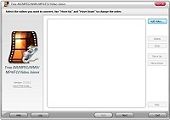
Free AVI/MPEG/WMV/MP4/FLV
Video Joiner, a perfect
easy-to-use video joiner
application, allows the
users to easily and quickly
join more than one video
file of different formats
to one file of a specified
format, including AVI,
MPEG, MP4, FLV, WMV, FLV,
etc.
Review: Great free tool
for joining video clips
together. Can take in most
formats and join them as
the same format, or most
other formats. One of only
a few that can also join
FLV files.
|
Video Format
Information
MPEG-2- 720 is the
standard video format for
DVDs before HD 1080. This
is the format to save to if
you want to keep non HD
video in high quality and
not loose any quality.
MPEG-1 will reduce the
quality of the video but
will have a smaller file
size.
MPEG-2-HD-1080 is the
new standard format for
saving HD video in high
quality and for DVDs. This
will be the best quality
for HD videos but also the
largest file sizes. Can
take hours to upload an HD
video to the Internet.
MPEG-4 is a format for
saving files at lower file
sizes. It compresses the
video to a much smaller
size, and at times it can
be quite hard to tell there
has been reduced quality.
Some Internet videos are in
MPEG-4, although most
Internet videos are now
FLV.
FLV is the most used
format for the Internet
such as YouTube as it
compresses the video file
down to really low file
sizes. If the video is of
high quality before being
converted to FLV, it can
still be reasonable quality
after being converted to
FLV at a fraction of the
file size. I usually
convert any videos to FLV
before uploading them to
YouTube, as it saves a lot
of time uploading.
WMV or Windows Media
Video, is a video
compression format
developed by Microsoft.
Only some video splitters
will split WMV files so if
you have WMV videos to be
split, make sure you buy a
splitter that can handle
this format such as the
Boilsoft Video Splitter.
Some films that can be
downloaded off the Internet
are in WMV format.
AVCHD is a format used
by many of the new Full HD
Cam Corders that record at
a resolution of 1080i. This
is a compression format
that allows you to store a
lot of HD on the Cam
Corders memory stick or
hard drive. The AVCHD
format can be burned to a
standard DVD disc or a
Blu-ray disc. Most of the
video splitters cannot
split this type of file
yet.
I use Pinnacle Studio HD
to convert the AVCHD files
off my HD Cam Corder to
MPEG-2-1080i, then I can
edit the MPEG-2 files in
any editor. There are now
AVCHD splitters, but I have
not tried any of these yet
to see if any work fast
without loss of
quality.
|
|
|
|
|
|
|